A fan translation of Elder Gate, a PlayStation role-playing game released only in Japan. After his battle with the god Dares, the god Ares created Rosuel and the Gate. Now the Gate Holes are closing, monsters are settling in around them, and the spirits' power has been stolen. Fiet sets out with Aisha, carrying the spirits' crests, entering each scenario through the Gate by its key number. It is free and non-commercial. The patch contains no game data: you apply it to your own copy of the Japanese disc. This is a beta; see Known issues below.
1.1.1-beta: playtest fixes
- After a certain battle effect, some words could go blank or turn to symbols until the game was restarted: place labels on the town map (House, Church, Tavern), "Choose Job" at the Gate, and words in conversations. The English no longer sits in the memory that effect uses.
- Names of two words keep their space in conversations and battle messages ("Giant Rat", "Kobold Captain's"); 1.1.0-beta read "Giant'gRat".
- Enemy names show in the battle target list when the party has one or two members.
- A quest item with a long name is stored whole ("Black Crystal Necklace" was cut to "Necklac"). A save made during such a quest keeps the cut name until the quest ends.
- Some yes/no questions showed a stray "No" or the question's lines out of place, and the speaker's name plate covered the first line of a tall text box.
- "Perfectly Ordinary Bow and Arrow" fits the shop's help box, and the shop's yes/no boxes no longer draw over a two-line help text.
- Items > Sort, the Spirits defense screen and the shop's Sort menu: labels and columns fit ("Accessory" ran past its box).
- Memory card saves from 1.1.0-beta load with the right names and places.
1.1.0-beta: second beta
- Keys read in English in the item bag ("Navy Key 2", "Crimson Key 1"); keys of every colour but the first could show Japanese or garbled letters.
- Weapons whose names are built from two parts have their space back ("Bullet Sword").
- Every menu checked again beside the Japanese disc. The HELP window (Select on any menu screen) is laid out for English and no longer covers the Save / Load choice; the Item Bag tab no longer covers "To Storage".
- The village menu no longer covers the first party member's name, the town map's place labels fit the screen, and the save screen's memory card box sits as in the original.
- Fixed the window glitches reported after the Eldra machine, in the weapon menu, on the yes/no prompt, after an inn stay, on the memory card prompt and when leaving town for a new area.
- Level-up and battle messages no longer repeat a word ("SilenceSilence"): the battle text's own argument codes are now read the way the battle text reads them.
- The church: companion names show in the Call list again, and the prayer and summon lines put the name in the right place.
- The Spirits Attack panel's "Element" line, the field map window, the item storage screen, the disc check screen, the quantity box, the shop's Sort, and the "can't carry" choice now fit and point at the right words.
- Saves made with 1.0.0-beta are not fully readable by this version (see Known issues).
1.0.0-beta: first public release
- The game's text: the story scenes and every townsperson's lines, the Gate console, the menus, items, equipment, spells and spirits, the shops, inns and churches, the battles and the save screens.
- Item descriptions in the shops use two lines, and the longest page to a third.
- Every townsperson line was opened one by one on the patched disc in the game's own talk window and measured; the rest was checked by reading each text back from the patched disc.
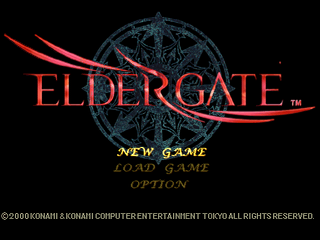
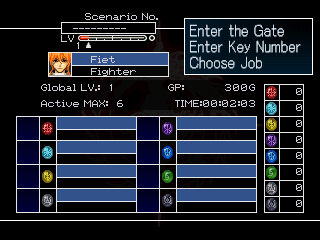
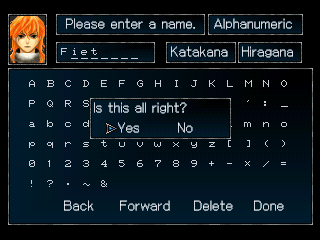
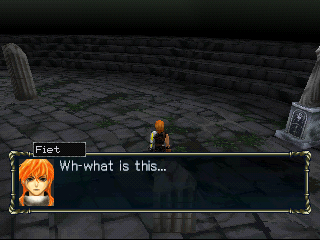
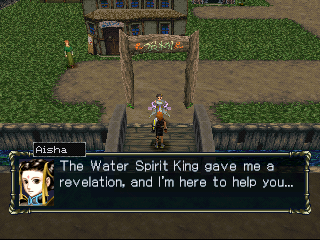
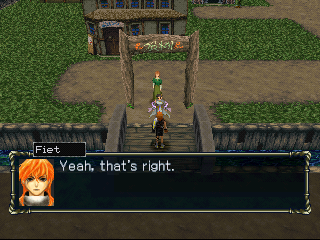
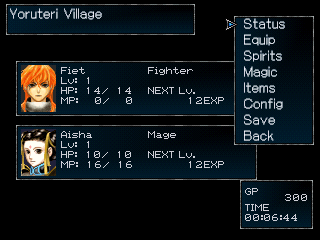
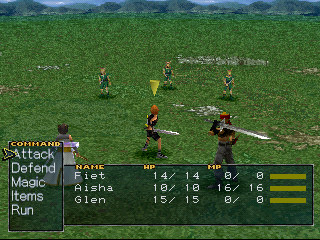
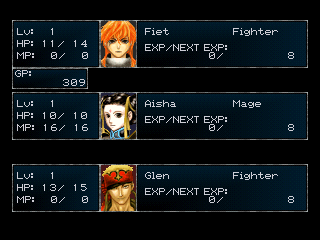
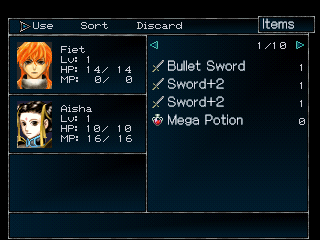
Native 320×240 captures of this build: nine from the automated walk from power-on (the title screen reduced from its 512-wide mode), and the item bag from a test that places items there. Not pictured: the dungeons and the later story.
The zip holds the patch, a readme and screenshots. The patch alone: ElderGate_EN_v1.1.1-beta.bps.
| File | ElderGate_EN_v1.1.1-beta.bps (221,299 bytes) |
| SHA-1 | 5c539567cbddf16a7d3b85ad197192fdc073feb6 |
| Source disc | Elder Gate (Japan) — Redump, one track, cue + BIN |
| Source track | Elder Gate (Japan).bin — 283,013,808 bytes |
| Source CRC32 | F793FDBA |
| Source SHA-1 | 3e06e3d5ee512140b0505cb8ef57791b637adbb2 |
| Patched track | 283,013,808 bytes |
| Patched CRC32 | E7771EEF |
| Patched SHA-1 | 6bbd5376c64dfa5831e9db02b9ef9f6be5473d73 |
- Start from the Redump dump of the Japanese disc:
Elder Gate (Japan).cueandElder Gate (Japan).bin, matching the checksums above. - Apply the
.bpstoElder Gate (Japan).binwith Flips, RomPatcher.js (in a browser) or beat. BPS checks the source checksum, so a patcher that rejects the file means the dump differs. - Give the patched file the same name as the original track, beside the cue sheet, and load the cue sheet in the emulator. Do not convert the patched disc to another format before checking that it boots.
Tested on. Beetle PSX (Mednafen), played by an automated walk of 85 captures from power-on through the opening, name entry, the Gate, Yoruteri Village, the field menu, a full battle and saving; this version was also play-tested in RetroArch (Beetle PSX). It has not been tried on other emulators or on real hardware.
- Saves made with 1.0.0-beta still load, but this version stores text differently, so on those saves the place name and the party names can read wrong, and the party names can be blank in the save/load list. Start a new game with this version.
- A few text routines (in the opening scene at the Gate, one shrine and two menus) are reached in a way the checks could not follow, so they were not seen running. If a window there looks wrong, please send a screenshot.
- The sword Eight Elements lists all eight of its elements in its help line in the item bag, and the line runs past the right edge before the sword's name. The Japanese line runs off the same way, so it was left as the original draws it.
- An emulator save state made with an earlier version keeps that version's text. Load your game from the memory card instead (in-game Load); memory card saves carry over.
- The story scenes that play during events were checked by drawing each line in the game's own window, not by reaching every scene in play.
- Shop item descriptions and the menu help line use two lines in English and sit lower on the screen than the original's one line. Emulators show the whole picture; on a CRT TV that hides a lot of the picture's edges, the bottom of the second line may be cut off.
- The "How many?" box when discarding items, the HELP window and the priest's menu are wider than the Japanese ones and cover a little more of what is behind them while open.
- The name-entry keyboard keeps its Katakana and Hiragana pages beside the English one, so names can still be typed in Japanese.
- Nothing after the opening hours has been played through by a tester. Please report anything that looks wrong, with a screenshot and where you were in the game.
The form takes screenshots and save states, and gives you a page to follow your report. You can also write instead:
Please write to phil@tttships.co with the version (1.1.1-beta), a screenshot, where you were in the game, and a memory card save or save state if you can.
Fan translation by CODEC BABEL (AI agents under a human lead). Elder Gate is © Konami; this page is not affiliated with them.